教你Adobe Acrobat Reader DC怎么禁止触摸模式?Adobe Acrobat Reader DC禁止触摸模式的方法。

想必大家一定很喜欢用Adobe Acrobat Reader DC这款软件,但是你知道如何关闭它的触控模式吗?接下来的文章将为大家介绍Adobe Acrobat Reader DC禁用触控模式的操作方法,感兴趣的朋友不妨阅读一下。
Adobe Acrobat Reader DC怎么禁止触摸模式?Adobe Acrobat Reader DC禁止触摸模式的方法
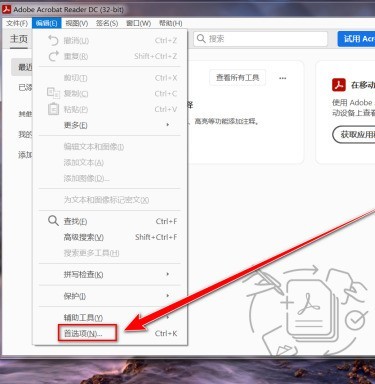
点击“Acrobat Reader DC”菜单栏上的“编辑”。
点击“首选项”。
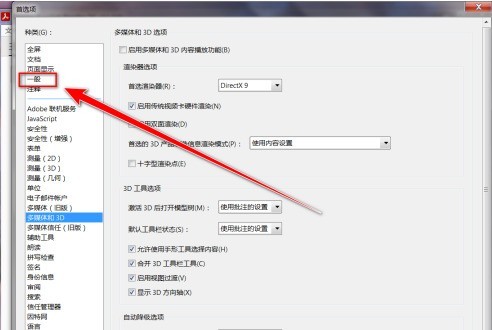
点击左侧的“一般”。
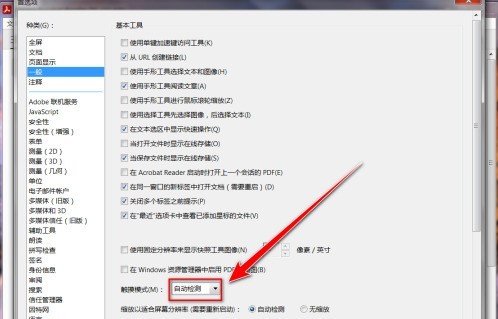
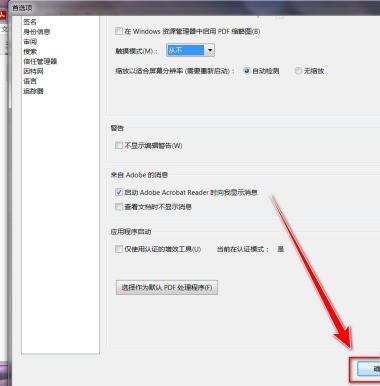
在“一般”设置页中,点击“触摸模式”右侧的下拉选择框。
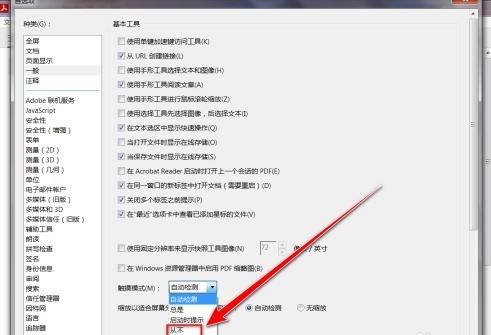
在下拉列表中,点击“从不”。
点击“确定”按钮。
以上就是小编带来的Adobe Acrobat Reader DC禁止触摸模式的方法,更多相关资讯教程,请关注ZOL下载。